
Driver Qualification File Management, Handled by LBC
Outsourced DQ file management for fleets that want a dependable team to keep the work moving. LBC handles document collection, follow-up, date tracking, and file organization so your people can focus on running the business.

LBC handles documentation, filing, and ongoing file maintenance—including cleanup of past quarters that fell behind.
Why fleets outsource DQ files to LBC
One organized workflow
MVRs, background checks, and drug tests move through one organized workflow—without your team juggling vendors.
Proactive follow-up
Drivers receive timely reminders before documents expire, with escalation to your team when follow-up is needed.
Industry specialists
Experienced account specialists who work in DOT compliance every day.
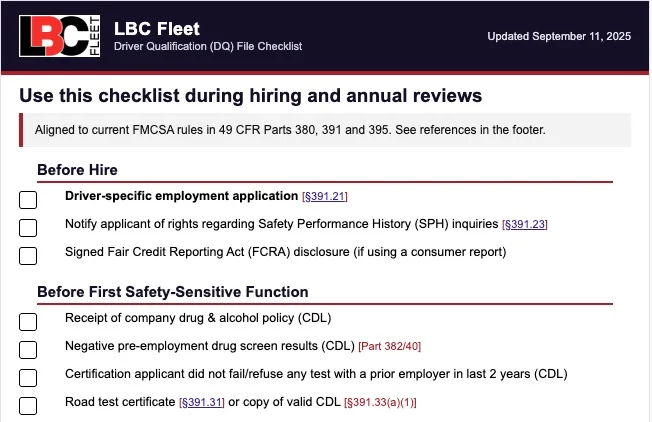
DQ File Compliance Checklist
Download our comprehensive Driver Qualification File checklist with FMCSA requirements and best practices your team can use.
Why fleets choose LBC Fleet for DQ file management
- Stay ahead of missing and expiring documents
- Prepare complete, organized DQ files for review
- Keep driver-file work organized and up to date
- Reduce administrative burden with tracking and follow-up
- Clean up past quarters that fell behind, not just maintain new files
LBC provides hands-on DQ file management: document collection, driver follow-up, date tracking, organized filing, and cleanup of files that fell behind.
For a practical look at how software and managed service work together, read where software helps with DQ files and where it does not. If you want to keep oversight in-house, electronic DQ file software gives your team the same organized workflow in-house. Our DOT compliance software can extend that operating picture across the rest of your program.
DQ file management that stays on track
LBC centralizes driver-file records, tracks important dates, and keeps the file work organized from onboarding through annual reviews.
You get a clearer picture of what is on file, what is coming due, and where follow-up is needed.
What must be included in a Driver Qualification File
Under 49 CFR §391.51, a DQF must include each driver's:
- Signed application for employment and work history (§391.21)
- Motor vehicle record (MVR) from each state where the driver held a license in the past three years (§391.23, §391.51)
- Road test certificate or CDL equivalent (§391.31, §391.33)
- Annual driving record review, with date and reviewer noted (§391.25)
- Medical Examiner's Certificate and verification that the examiner is on the National Registry (§391.43, §391.51)
- Skill Performance Evaluation or medical exemption documentation, if needed (§391.49)
Learn more: FMCSA DQ File Requirements. For the full library of compliance forms and tools, see our DOT compliance resource hub.
Who needs a Driver Qualification File?
Any driver who operates a commercial motor vehicle (CMV) in interstate commerce must have a Driver Qualification File (DQ File) under FMCSA Part 391. This applies to CDL and non-CDL drivers alike. If a driver fits any of the categories below, a DQ File is required:
Weight threshold: Vehicles with GVWR/GCWR or actual weight of 10,001 lb or more, including non-CDL straight trucks, box trucks, service bodies, and pickups towing heavier trailers.
Passenger carriers: Vehicles designed or used to transport more than 8 passengers (including the driver) for compensation, or more than 15 passengers not for compensation (e.g., employee or church shuttles).
Hazardous materials: Any vehicle transporting hazardous materials that require placards.
CDL activities: Drivers of 26,001+ lb CMVs, combinations over 26,001 lb, or vehicles requiring passenger or hazmat endorsements. Learn more about CDL requirements.
Owner-operators: Even single-truck businesses must maintain their own DQF. If leased to a motor carrier, the carrier must maintain the DQF, but the owner-operator is still responsible for staying compliant.
Intrastate operations: Many states adopt Part 391 for intrastate carriers as well. If you run intrastate only, you may still need DQ Files depending on state rules and vehicle weight. (We can help you identify the state rules and vehicle thresholds that apply to your operation.)

Key requirements
- Complete employment application
- Current MVRs from all states
- Valid DOT medical certificate
- Road test or CDL documentation
- Annual driving record reviews
- Safety performance history
Why DQ files matter, and how to avoid costly FMCSA violations
Incomplete or outdated Driver Qualification Files (DQ Files) are among the most commonly cited violations in FMCSA compliance reviews. Gaps like missing employment applications, expired DOT medical certificates, no documented annual MVR review, undocumented safety-performance history checks, or absent road-test/skills verification can trigger acute violations. The result isn't just fines. Carriers risk failed audits, contract losses with shippers and brokers, insurance friction, and a weakened safety rating that follows you to your next bid.
A compliant DQ File should clearly show that each driver is qualified to operate a CMV today, not last year. That means complete hiring paperwork, pre-employment checks, medical and license status that are current, and annual driving-record reviews with evidence that you actually looked and acted on what you found. When those elements are tracked proactively, you shrink audit exposure, speed up document requests, and keep your operation moving.
DQ file issues we fix
- Expired or missing DOT medical examiner's certificates or status on the MVR
- No pre-employment MVR or annual MVR review on file
- Incomplete employment application or missing previous-employer safety performance history inquiries
- No road-test/skills documentation (or CDL equivalent)
- Unfiled updates after license changes, suspensions, or medical status changes
Compared to the alternatives
There are several ways to manage DQ files. The real difference is not where the documents sit. It is who owns the follow-up when something is missing, expiring, or inconsistent.
Keep DQ files in-house
The pitch: “Our office already handles driver paperwork.”
This can work when one trained employee owns every file, every renewal, and backup coverage. It breaks down when DQ work competes with dispatch, payroll, hiring, or daily operations.
Use DQ software only
The pitch: “The alerts will keep us compliant.”
Software improves visibility, but your team still reviews documents, contacts drivers, resolves gaps, and proves follow-through. If that is the right fit, see our electronic DQ file software.
Use shared folders and spreadsheets
The pitch: “We just need a better filing system.”
This is inexpensive, but documents, dates, and review notes live in separate places. A file can look organized without proving that every required check was completed and reviewed.
Wait until an audit exposes the gaps
The pitch: “We will clean it up if FMCSA asks.”
That turns a maintenance problem into an emergency. See why DQ files fail DOT audits and what investigators expect to find.
LBC Fleet combines the system, document review, driver outreach, escalation, and ongoing maintenance. Outsourced DQ file management is for fleets that want one accountable team to own the follow-through.
How our DQ file management process works
Driver onboarding made simple
As soon as you identify a new potential driver, LBC gets the onboarding workflow moving and flags issues for your review:
- Assist applicants with questions
- Conduct employment verifications and FMCSA Clearinghouse checks
- Verify previous employers
- Manage drug-testing and background checks
- Flag any issues for your review
Ongoing file maintenance & expiration tracking
LBC tracks your driver-file dates and keeps the follow-up moving:
- Sends drivers reminders before documents expire
- Contacts drivers directly when updates are missed
- Notifies your team when follow-up needs attention, keeping you in control
Annual reviews & regulatory updates
Our services don't stop at setup. We:
- Perform annual DQ file reviews
- Prepare organized files for annual review
- Keep file maintenance moving throughout the year
Send us your files electronically. We will show you what is missing, what is expiring, and where your file process needs attention—then help get it organized.
Frequently asked questions
What is a Driver Qualification File (DQ File)?
A DQ File is an official record maintained by motor carriers to prove each driver meets DOT qualifications. It includes documentation like employment applications, MVRs, medical examiner certificates, and annual reviews.
Who needs a Driver Qualification File?
Every interstate motor carrier must maintain a DQ File for each commercial motor vehicle driver, including CDL and non-CDL drivers, owner-operators, and anyone transporting passengers or certain cargo.
What documents are required in a DQ File?
Required items include a signed employment application, MVRs, road test or CDL, annual record reviews, medical exam certificate, and skill performance or exemption documentation if applicable. View our DQ File Checklist.
Why do DQ Files fail compliance?
DQ Files often fail compliance due to missing or outdated documentation, such as expired medical certificates, unchecked MVRs, or incomplete employment records, which leads to fines and penalties.
How long must DQ File records be retained?
Active driver files must be maintained while the driver is employed. After a driver leaves, most records must be retained for three years. Specific documents like accident records and annual reviews have additional retention requirements under FMCSA regulations.
Can I maintain DQ Files electronically?
Yes, FMCSA allows electronic record retention as long as the records are readily accessible, secure, and can be produced during audits or roadside inspections. Confirm the applicable service documentation for security, retention, export, and access controls.
Want this off your plate?
LBC Fleet manages your driver qualification files from onboarding through ongoing maintenance, including cleanup of past quarters that were never properly maintained.
Resources: FMCSA DQ File Requirements, LBC Fleet DQ Checklist, FMCSA.
Browse our complete library of FMCSA compliance resources, including forms, guides, and interactive tools.
Driver Qualification File Management, Organized for Review
Outsourced DQ file management for fleets that need a defined, organized workflow. LBC can help coordinate document collection and follow-up, track selected renewal dates, and prepare available records for carrier review within a written service scope.
LBC can help organize documentation, filing, and ongoing administrative support within the written scope.
Why fleets outsource DQ files to LBC
1 click
LBC can coordinate administrative follow-up across the agreed workflow and authorized providers.
Configured follow-up
Configured reminders and escalation can support follow-up when records need attention.
Industry specialists
Experienced support staff for the agreed workflow.
DQ File Compliance Checklist
Download our comprehensive Driver Qualification File checklist with FMCSA requirements and best practices your team can use.
Why fleets choose LBC Fleet for DQ file management
- Make open driver-file work easier to see and follow up
- Support organized preparation for carrier review
- Keep driver-file work organized for qualified carrier review
- Support configured reminders and administrative follow-up
- Clean up past quarters that fell behind, not just maintain new files
LBC’s role is administrative support within the agreed scope; carrier qualification decisions, required action, and compliance remain with the motor carrier and applicable qualified parties.
For a practical explanation of the boundary between tools and managed service, read where software helps with DQ files and where it does not. If you want to keep oversight in-house, electronic DQ file software supports the workflow while your team remains responsible for review and follow-through. Our DOT compliance software can extend that operating picture across the rest of your program.
Organized driver-file management
Within the agreed scope, LBC helps organize driver-file records, track selected dates, and prepare available records for carrier review.
We help make present records, follow-up needs, and next actions visible for the carrier’s review.
What must be included in a Driver Qualification File
Under 49 CFR §391.51, a DQF must include each driver's:
- Signed application for employment and work history (§391.21)
- Motor vehicle record (MVR) from each state where the driver held a license in the past three years (§391.23, §391.51)
- Road test certificate or CDL equivalent (§391.31, §391.33)
- Annual driving record review, with date and reviewer noted (§391.25)
- Medical Examiner's Certificate and verification that the examiner is on the National Registry (§391.43, §391.51)
- Skill Performance Evaluation or medical exemption documentation, if needed (§391.49)
Learn more: FMCSA DQ File Requirements. For the full library of compliance forms and tools, see our DOT compliance resource hub.
Who needs a Driver Qualification File?
Any driver who operates a commercial motor vehicle (CMV) in interstate commerce must have a Driver Qualification File (DQ File) under FMCSA Part 391. This applies to CDL and non-CDL drivers alike. If a driver fits any of the categories below, a DQ File is required:
Weight threshold: Vehicles with GVWR/GCWR or actual weight of 10,001 lb or more, including non-CDL straight trucks, box trucks, service bodies, and pickups towing heavier trailers.
Passenger carriers: Vehicles designed or used to transport more than 8 passengers (including the driver) for compensation, or more than 15 passengers not for compensation (e.g., employee or church shuttles).
Hazardous materials: Any vehicle transporting hazardous materials that require placards.
CDL activities: Drivers of 26,001+ lb CMVs, combinations over 26,001 lb, or vehicles requiring passenger or hazmat endorsements. Learn more about CDL requirements.
Owner-operators: Even single-truck businesses must maintain their own DQF. If leased to a motor carrier, the carrier must maintain the DQF, but the owner-operator is still responsible for staying compliant.
Intrastate operations: Many states adopt Part 391 for intrastate carriers as well. If you run intrastate only, you may still need DQ Files depending on state rules and vehicle weight. (Confirm intrastate applicability with qualified counsel or the appropriate state agency.)
Key requirements
- Complete employment application
- Current MVRs from all states
- Valid DOT medical certificate
- Road test or CDL documentation
- Annual driving record reviews
- Safety performance history
Why DQ files matter, and how to avoid costly FMCSA violations
Incomplete or outdated Driver Qualification Files (DQ Files) are among the most commonly cited violations in FMCSA compliance reviews. Gaps like missing employment applications, expired DOT medical certificates, no documented annual MVR review, undocumented safety-performance history checks, or absent road-test/skills verification can trigger acute violations. The result isn't just fines. Carriers risk failed audits, contract losses with shippers and brokers, insurance friction, and a weakened safety rating that follows you to your next bid.
A compliant DQ File should clearly show that each driver is qualified to operate a CMV today, not last year. That means complete hiring paperwork, pre-employment checks, medical and license status that are current, and annual driving-record reviews with evidence that you actually looked and acted on what you found. When those elements are tracked proactively, you shrink audit exposure, speed up document requests, and keep your operation moving.
DQ file issues we help organize for carrier review
- Expired or missing DOT medical examiner's certificates or status on the MVR
- No pre-employment MVR or annual MVR review on file
- Incomplete employment application or missing previous-employer safety performance history inquiries
- No road-test/skills documentation (or CDL equivalent)
- Unfiled updates after license changes, suspensions, or medical status changes
Compared to the alternatives
There are several ways to manage DQ files. The real difference is not where the documents sit. It is who owns the follow-up when something is missing, expiring, or inconsistent.
Keep DQ files in-house
The pitch: “Our office already handles driver paperwork.”
This can work when one trained employee owns every file, every renewal, and backup coverage. It breaks down when DQ work competes with dispatch, payroll, hiring, or daily operations.
Use DQ software only
The pitch: “The alerts will keep us compliant.”
Software improves visibility, but your team still reviews documents, contacts drivers, resolves gaps, and proves follow-through. If that is the right fit, see our electronic DQ file software.
Use shared folders and spreadsheets
The pitch: “We just need a better filing system.”
This is inexpensive, but documents, dates, and review notes live in separate places. A file can look organized without proving that every required check was completed and reviewed.
Wait until an audit exposes the gaps
The pitch: “We will clean it up if FMCSA asks.”
That turns a maintenance problem into an emergency. See why DQ files fail DOT audits and what investigators expect to find.
LBC Fleet combines the system, document review, driver outreach, escalation, and ongoing maintenance. Outsourced DQ file management is for fleets that want one accountable team to own the follow-through.
How our DQ file management process works
Driver onboarding made simple
When a potential driver is identified, LBC can assist with the agreed onboarding workflow and flag issues for the carrier’s review:
- Assist applicants with questions
- Coordinate authorized employment-verification requests and Clearinghouse-related administrative steps
- Assist administratively with authorized prior-employer inquiries
- Coordinate with qualified drug-testing and background-screening providers when authorized
- Flag any issues for your review
Ongoing file maintenance & expiration tracking
Within the written service scope, LBC can track selected dates and coordinate administrative follow-up:
- Uses configured reminder timing for selected document dates
- Coordinates follow-up where authorized by the carrier
- Escalates unresolved items to the customer team under the agreed workflow
Annual reviews & regulatory updates
Our services don't stop at setup. We:
- Perform annual DQ file reviews
- Prepare records for the carrier’s authorized reviewer
- Support an organized annual review workflow
Send us your files electronically. We can help organize supplied records, identify potential follow-up items, and define an administrative scope for carrier review.
Frequently asked questions
What is a Driver Qualification File (DQ File)?
A DQ File is an official record maintained by motor carriers to prove each driver meets DOT qualifications. It includes documentation like employment applications, MVRs, medical examiner certificates, and annual reviews.
Who needs a Driver Qualification File?
Every interstate motor carrier must maintain a DQ File for each commercial motor vehicle driver, including CDL and non-CDL drivers, owner-operators, and anyone transporting passengers or certain cargo.
What documents are required in a DQ File?
Required items include a signed employment application, MVRs, road test or CDL, annual record reviews, medical exam certificate, and skill performance or exemption documentation if applicable. View our DQ File Checklist.
Why do DQ Files fail compliance?
DQ Files often fail compliance due to missing or outdated documentation, such as expired medical certificates, unchecked MVRs, or incomplete employment records, which leads to fines and penalties.
How long must DQ File records be retained?
Active driver files must be maintained while the driver is employed. After a driver leaves, most records must be retained for three years. Specific documents like accident records and annual reviews have additional retention requirements under FMCSA regulations.
Can I maintain DQ Files electronically?
Yes, FMCSA allows electronic record retention as long as the records are readily accessible, secure, and can be produced during audits or roadside inspections. Confirm the applicable service documentation for security, retention, export, and access controls.
Want this off your plate?
LBC Fleet can support driver-file organization and administrative follow-up within an agreed scope. The carrier remains responsible for qualification decisions, required action, and compliance.
Resources: FMCSA DQ File Requirements, LBC Fleet DQ Checklist, FMCSA.
Browse our complete library of FMCSA compliance resources, including forms, guides, and interactive tools.