
Fleet management software built by a fleet management company.
Work orders, AI-assisted invoice processing, PM scheduling, driver scheduling, parts tracking, and cost reporting, built since 2014 by a fleet manager running a 100-vehicle operation. Used in production on customer fleets across the country. Most fleet management software comes from software companies. This one doesn't.
Three things that make our fleet management software different
Designed by an operator, not by developers
Every screen exists because someone here needed it to manage real vehicles, real drivers, and real DOT files in production. Not because a focus group asked for it.
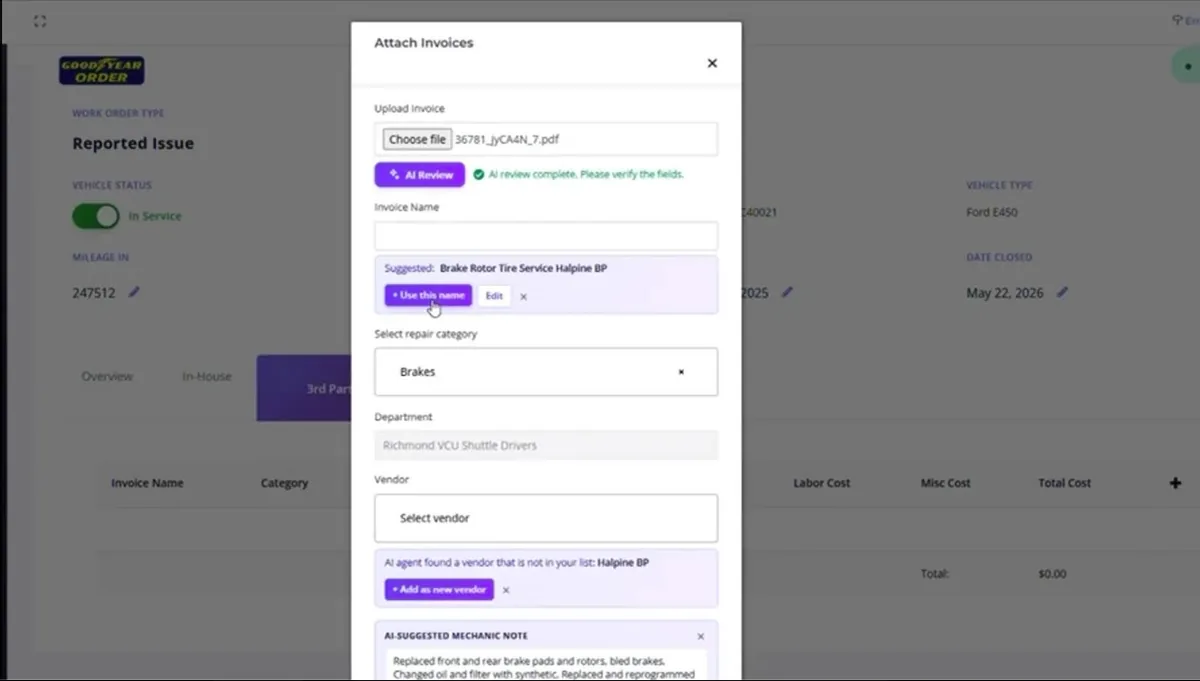
AI-assisted vendor invoice review
Upload a vendor invoice PDF and the AI extracts line items, suggests a vendor, drafts the mechanic note, and routes it for verification. The most tedious task in fleet maintenance, automated.
Fleet operations and DOT compliance, same login
Run work orders, dispatch, and maintenance on the operations side. Run DQ files, expirations, and drug-test compliance on the same database. Most fleet platforms can't do this. We can.
On this page
Jump to the section you need.
LBC Fleet Software Guides
Step-by-step walkthroughs of every workflow inside LBC Fleet, covering work orders, AI invoice processing, PM scheduling, driver scheduling, reports, and more. Searchable, filterable, growing weekly.
Browse the Software GuideWhy a fleet manager built fleet management software
In 2014, the team behind LBC Fleet was running a 100-vehicle operation and couldn't find software that did what a fleet manager actually needed. So we started writing it ourselves, in the same office where we handled work orders, DOT files, and dispatch every day.
Twelve years later, that software is what LBC Fleet uses to manage customer fleets across the country. Every workflow on the screen exists because someone here needed it in production.
- Work orders that flow from driver report to mechanic to invoice
- PM scheduling per model with single-vehicle overrides, by date, mile, or engine hour
- Driver scheduling with text confirm/deny and wake-up automation
- Parts inventory with email-ready ordering sheets
- Cost-per-mile and costing-by-vendor reports on demand
- DOT compliance integration covering DQ files, expirations, and audit-ready records
Built by transportation people
This software was built starting in 2014 by a fleet manager who needed it to do his own job, running work orders, DOT files, and dispatch for a 100-vehicle operation.
The team behind LBC Fleet didn't come up through software. We came up through transportation: detailing 18-wheelers, changing tires, OTR driving, local driving, fleet management, compliance.
That's why every workflow on the screen exists. Because someone here needed it in production.
Everything in our fleet management software
Modular. Use what you need. Add modules when you're ready.
Built on one platform with one login. Modules talk to each other. Vendor invoices flow into cost reports, eDVIR defects flow into work orders, work orders flow into preventative maintenance compliance. Add the modules your operation needs; turn on the rest when you grow.
Four module groups: work orders and maintenance, scheduling and dispatch, reporting and cost analysis, and HR with DOT compliance integration.
Work orders and maintenance
- Work orders from driver-reported issues, eDVIR defects, and PM schedules, the core of our fleet work order software
- AI invoice processing: upload, extract, verify, attach
- PM scheduling per model with vehicle-level exceptions (date, mile, or engine hour)
- Parts inventory tracking and email-ready parts ordering
- Preventative maintenance compliance reporting
- Downtime and repair-time tracking
Scheduling and dispatch
- Driver scheduling based on availability
- Shift text alerts with confirm/deny driver responses
- Wake-up text automation for early shifts
- In-route text automation
- Time-off and vacation tracking
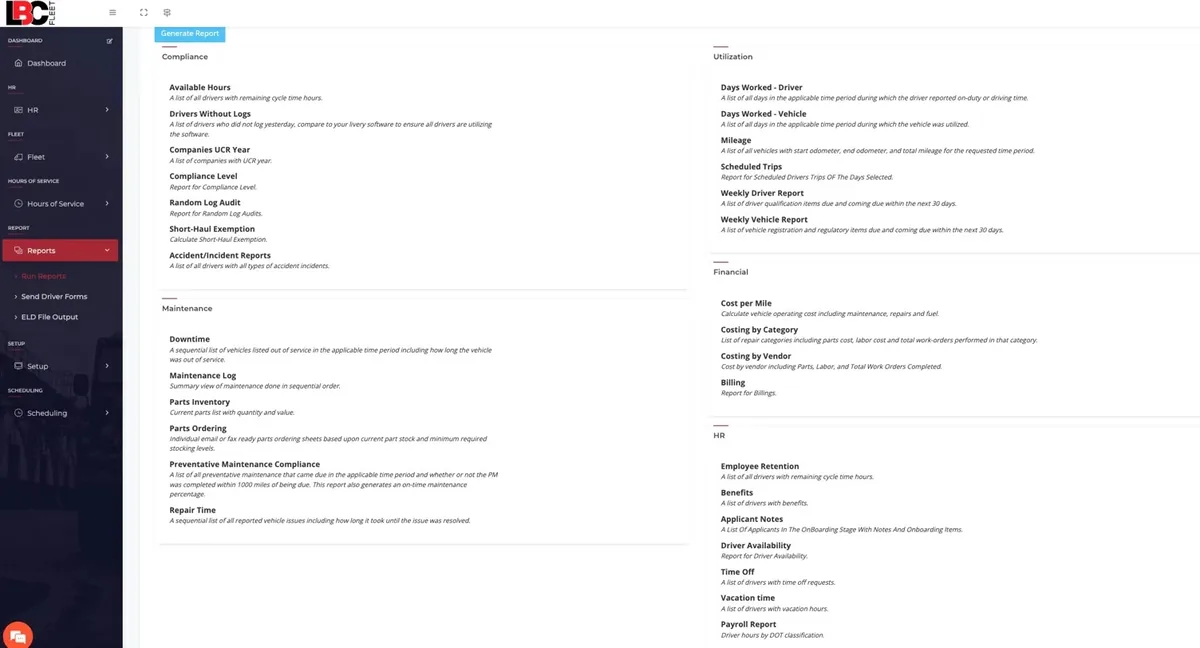
Reporting and cost analysis
- Cost per mile by vehicle
- Costing by repair category and by vendor
- Utilization and mileage by driver and vehicle
- Weekly driver and weekly vehicle reports
- Billing, accident, and incident reporting
HR and DOT compliance integration
- Applicant tracking and onboarding
- Hours of Service tracking with short-haul exemption
- Random log audits
- Driver qualification files. See DOT compliance automation software for the full compliance suite
See the AI invoice workflow
Follow a vendor invoice from upload through AI suggestions, human review, and attachment to a work order.
Quick reference: the AI invoice workflow
- Upload the invoice. Drag-and-drop or browse. Use a supported invoice file for AI-assisted extraction, then review the suggested fields before saving.
- AI extracts the data. The system parses vendor name, parts and labor line items, totals, work performed, and any reference numbers.
- Review the AI's suggestions. Suggested invoice name, repair category, vendor match (with one-click "add as new vendor" if unknown), and a drafted mechanic note are presented for verification.
- Verify the cost line items. Parts cost, labor cost, miscellaneous cost, and total are pulled from the invoice. Override any field that doesn't match.
- Submit. The invoice attaches to the open work order. The mechanic note is added. The vendor record updates. Cost reports pick it up automatically.
Human verification before save is required by design. The AI does the typing; you confirm the result.
Reviewing a repair before approval? Use the five common fleet repair estimate red flags to check labor, parts, diagnostic support, fees, and warranty language.
Who this software is built for
Operations leads who outgrew spreadsheets
You've been running work orders in Excel, vendor invoices in a folder, and PM schedules in a shared calendar. It worked at ten vehicles. It does not at forty.
Existing LBC compliance customers adding operations
You already use LBC for DQ files, drug testing, or audit prep. Now you want the operations side, meaning work orders, maintenance, and scheduling, on the same platform with the same login.
Fleet managers tired of vendors who have never managed a fleet
You have tried the big platforms. They are built by software people. You want a tool built by someone who has actually sat in your seat.
Standalone fleet operations software, or integrated with DOT compliance
Most companies start with one side and add the other when they are ready. Both run on the same platform.
Standalone fleet operations
Run work orders, maintenance, scheduling, parts, and cost reporting. No compliance module required. Replace your current fleet management software, keep your existing DQ vendor (or your spreadsheets).
Integrated with DOT compliance
Add the compliance suite when you are ready. That covers driver qualification files, expiration tracking with driver-activated proof capture, drug-test integration, and audit-ready records, all on the same login. See DOT compliance automation software for the compliance entry point, or electronic DQ file software for the DQ-module-only deep dive.
You can also start with the human-managed side, outsourced DQ file management, and migrate to the software when you have the in-house capacity to run it.
What runs where
Fleet Software: work orders, AI invoice processing, PM scheduling, driver scheduling, parts, cost reporting, accident and incident tracking, utilization reports, HR.
DOT Compliance Software: DQ files, expiration tracking with driver-activated proof capture, MVR, background check, and drug-test ordering, audit-ready exports, HOS, ELD.
Same login. Same dashboard. Different modules. Pay only for the ones you use.
What happens when fleet management software was not built by an operator
Most fleet management software comes from companies whose founders have never managed a fleet. You can see it in the workflows.
Work orders that do not match how mechanics actually work. PM schedules that cannot handle a mixed-model fleet without ugly workarounds. Vendor management that treats every invoice as a one-off. Reports that look great in a demo and miss the question you actually had. No bridge to the compliance side, because the software company does not know what FMCSA cites.
Fleet operations software built by an operator anticipates these problems because the operator hit them in production first.
Where other platforms fall short
- Work order workflow that does not match the shop's actual process
- PM schedules that force one-size-fits-all by model
- No AI on the tedious parts, so manual invoice entry every time
- Driver scheduling that does not text drivers or capture confirm/deny
- Vendor management with no real cost-per-vendor reporting
- Zero integration with DOT compliance, meaning DQ files, expirations, and audit prep stay separate
Get started in three steps
Walkthrough
- 20-minute platform demo
- Discuss your current setup
- Identify which modules fit
- Pricing for your fleet size
Deploy and import
- Vehicle, driver, vendor data imported
- PM schedules configured per model
- ELD and telematics integration set up
- 2-week typical timeline
Train and run
- Team training on the modules you use
- Mechanic walkthroughs for work orders and AI invoice
- Ongoing support from real people who have managed fleets
- Add modules as you grow
20-minute walkthrough. No commitment. Modular pricing for what you actually use.
Fleet management software FAQ
How does pricing work?
Modular, monthly per-vehicle and per-driver. Pay for what you use. No annual contracts. Add a vehicle, you pay for that vehicle. Lose one, you stop paying. Send us your fleet size for an exact quote at the quote page.
How does the DOT compliance integration work?
Fleet operations and DOT compliance run on the same platform. The fleet software handles work orders, maintenance, scheduling, parts, and cost reporting. The compliance module handles DQ files, expirations, drug-test integration, and audit-ready exports. Same login, same database, same dashboard, different modules. Many customers start with one side and add the other when they are ready.
Can this replace our current fleet management platform?
Yes. We migrate data from spreadsheets, Excel, or another fleet management platform during onboarding. Most switches happen within two weeks. The reasons customers switch to LBC Fleet are usually (a) the DOT compliance integration nobody else offers, (b) the AI invoice processing, or (c) practitioner-built workflows that match how the shop actually works.
How accurate is the AI invoice processing?
The AI extracts vendor, parts, labor, totals, and work performed from any vendor invoice PDF. Human verification before save is required by design. The system flags anything it is not sure about (unknown vendor, unexpected category, missing fields) and asks you to confirm. Designed for human-in-the-loop accuracy, not full automation.
Can we keep our existing ELD?
Yes. The platform integrates with Samsara and Motive, so DVIRs feed in directly. You can also use the LBC driver app for QR-code inspections and body-damage reporting, or run both side-by-side.
How long does onboarding take?
Two weeks typical. Vehicle, driver, vendor, and PM-schedule data imported during week one. Training and live use during week two. Larger fleets sometimes stretch to four weeks for full team training.
Does the AI invoice work with all vendors?
Not for every layout. Confirm the currently supported file types and test representative invoices from your vendors. Extracted fields require human review before saving. New vendors get flagged for one-click addition to your vendor list.
Talk to someone who has managed a fleet.
20-minute call. Real answers about whether this is the right fit for your operation.
Book a Demo
Other parts of the LBC Fleet platform
DOT compliance automation software
The compliance side of the same platform, covering DQ files,
See what can actually live in one platform before adding separate vendors.
driver-activated expiration tracking, and audit-ready exports.Fleet maintenance costs
Goodyear's national network pricing through LBC. Invoices auto-attach to work orders. 20% to 50% PM savings typical.
LBC GPS and telematics
Vehicle and trailer tracking, dash cameras, and tool-level tracking, fully integrated with the fleet software.