Fleet Manager Efficiency: The Five Tasks That Drain Most Workweeks
Most fleet managers know their week wastes time but can’t name exactly where. Here are the five biggest administrative drains in a typical fleet office, what they cost on average, and what good looks like for each.
And most of the work that happens at that desk is administrative friction. Fifteen minutes here, twenty minutes there, multiplied across a 40-vehicle fleet doing ten repairs a week and dispatching forty drivers a day. The numbers add up faster than most managers track.
This post names the five biggest administrative drains in a typical fleet office, gives the typical cost in hours per week, and describes what good looks like for each. The point isn’t to sell a tool. The point is to name the work so you can evaluate any tool — including the one you’re using now — against the criteria that actually matter.
The five friction points
1. Vendor invoice entry
2. New vendor onboarding
3. Reconciling invoices to work orders
4. Mechanic notes and repair documentation
5. Compliance records that don’t talk to operations
How they stack
FAQ
1. Vendor invoice entry
The problem. A vendor invoice PDF arrives. Someone opens it. They type the vendor name. The parts cost. The labor cost. The miscellaneous cost. The total. They summarize what was done from the work description. They match it to the right driver, the right vehicle, the right repair category. If the vendor isn’t in the system yet, they stop to create the vendor record first. Then they save the invoice to the work order.
The math. Roughly 20 minutes per invoice. A typical 40-vehicle fleet processes about 30 invoices a week. That’s 10 hours per week of pure data entry — 500 hours per year. Twelve full workweeks of someone typing data that already exists in the PDF.
What good looks like. A tool that extracts the structured data from the PDF automatically — vendor name, line items, totals, work performed — and presents it for human verification before saving. Not full automation. Human-in-the-loop. The AI does the typing; the operator confirms the result. The verification step is where vendor billing errors get caught, which is genuinely valuable work; the typing isn’t.
Here’s that workflow in action. Watch a vendor invoice get uploaded, parsed, verified, and attached to a work order in about 20 seconds:
This particular workflow is from LBC Fleet’s fleet management software, but the criteria — automatic extraction, human verification, attached to the work order — apply to any tool you evaluate.
2. New vendor onboarding
The problem. Halfway through an invoice entry, you realize the vendor isn’t in your system. So you stop. Open the vendor record. Type the name. The address. The phone. The tax ID. The payment terms. Save the vendor. Return to the invoice. Hope you didn’t lose any of the data you’d already entered.
The math. Two or three new vendors per month for an active shop. Ten to fifteen minutes each on the vendor record itself, plus the lost-context cost of breaking flow mid-entry. Doesn’t sound like much in isolation. Adds up to about eight hours per year of pure context-switching — and that’s before counting the typing.
What good looks like. One-click vendor creation from inside the invoice workflow. The system recognizes the new vendor name on the PDF, asks “add as new vendor?”, and lets you populate the vendor record without leaving the invoice screen.
Related reading
The five most common red flags in a fleet repair estimate
Onboarding a vendor is easier when you know what their estimate quality predicts about their billing.
3. Reconciling invoices to work orders
The problem. Repair happens Monday. Vendor invoice arrives Friday. Someone has to find the matching work order — by date, by VIN, by PO number — to attach the invoice. Then validate the costs against the original estimate. Then confirm the parts billed match the parts on the work order. Then close the work order.
The math. Maybe five minutes per reconciliation when everything lines up. Twenty to thirty minutes when it doesn’t — wrong vehicle on the invoice, vendor billed for parts the work order didn’t authorize, missing the PO number entirely. Half of invoices reconcile cleanly; the other half eat the budget.
What good looks like. PO-number or VIN-driven auto-attach. The vendor’s invoice carries the PO number, the system reads it, and the invoice routes to the right open work order automatically. Manual matching becomes the exception, not the default. Discount-program invoices (Goodyear, fleet fuel networks, national accounts) auto-attach without ever passing through manual entry — see fleet maintenance cost programs for how that integration works in practice.
4. Mechanic notes and repair documentation
The problem. The mechanic does the work. The mechanic writes it on paper, or tells the office, or scribbles on the back of the work order ticket. Days or weeks later, someone tries to type that into the system. Context is gone. Half the time the documented note ends up as “fixed brakes” — accurate but useless for tracking patterns.
The math. Harder to quantify than the others. The cost shows up later — when a recurring brake issue can’t be diagnosed from history, when a warranty claim fails because documentation is thin, when an FMCSA auditor asks for maintenance records and you can’t produce specifics. Companies discover this cost during the audit, not during the repair.
What good looks like. AI drafts the mechanic note from the vendor invoice’s work-performed description, or from the shop ticket if it’s an in-house job. The mechanic reviews and edits in real time, not days later. The note ends up specific because the source was specific — “replaced front and rear brake pads, rotors, bled brakes, replaced 2 TPMS sensors, mounted and balanced 4 new Continental tires” — instead of “fixed brakes.”
Related reading
Preventative maintenance fundamentals
Documentation discipline is what turns PM data into a diagnostic asset later.
5. Compliance records that don’t talk to operations
The problem. Maintenance lives in one system. Driver qualification files, medical certificate expirations, drug test records, and hours-of-service logs live in another. Same vehicle. Same driver. Two databases. Two logins. Two sets of data entry. When the FMCSA audit notice arrives, you spend the next 60 days copying data between them so the auditor sees a consistent record.
The math. The 60-day audit prep is the visible cost. The invisible cost is the daily friction — a driver’s medical certificate expires and the operations side doesn’t know, so dispatch schedules the driver anyway and the company gets cited. Or a driver fails a drug test and there’s no automated bridge to deactivate them in the dispatch system. The cost lives in the gap between the two systems.
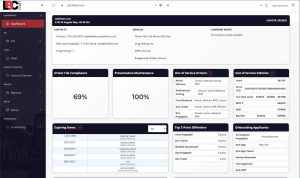
What to verify. Ask the vendor to demonstrate, in your actual configuration, which records are shared between maintenance and DOT compliance, who can see them, and what happens when a medical certificate or inspection is due. Do not assume a warning blocks dispatch or creates a work order until you have tested it. Review LBC Fleet’s DOT software overview as a starting point, then request a workflow demo and written scope.
How these five friction points stack
Each of these five drains takes five to fifteen hours a week for a typical fleet manager. Solving one of them — say, AI invoice processing — moves the needle a real amount but doesn’t change the job. Solving all five does.
Most fleet software doesn’t address them because most fleet software was built by software companies, not by fleet managers who lived these tasks daily. The friction points are obvious to anyone who’s sat at the shop office desk for a week. They’re not obvious to product teams building from spec sheets and competitive feature lists.
If you’re evaluating a tool — including the one you’re using now — these five friction points are the criteria worth measuring. How long does each task take? How much of it is data entry? How much is context switching? How much depends on someone remembering to do it?
For LBC Fleet’s take on the same five questions, see fleet management software. For the human-managed alternative — a dedicated Fleet Manager without the full-time hire — see outsourced fleet management services.
Fleet manager efficiency FAQ
What does a typical fleet manager’s workweek actually look like?
Roughly 60% operational (dispatch, driver issues, customer calls, fleet planning), 30% administrative (invoice entry, work order documentation, compliance paperwork, reporting), and 10% strategic (analysis, vendor negotiation, hiring). The administrative percentage scales with fleet size and software quality — a small fleet on good software runs closer to 20% admin; a larger fleet on old software can hit 40% or more.
How much time does manual invoice entry actually cost?
For a typical 40-vehicle fleet processing 30 vendor invoices a week, manual entry runs about 10 hours per week — 500 hours per year. AI extraction with human verification drops that to about 30 minutes per week, roughly 25 hours per year. The remaining time is the verification step, which is genuinely valuable work; it catches vendor billing errors before they’re paid.
What’s the difference between fleet maintenance software and a full fleet management platform?
Fleet maintenance software handles work orders, PM scheduling, parts, and cost reporting. A full fleet management software platform adds operations (dispatch, scheduling, driver management), HR (applicant tracking, time off, payroll), reporting (utilization, financial), and ideally DOT compliance integration. The distinction matters when evaluating tools — a maintenance-only tool won’t solve friction points 4 and 5; a full platform should.
Can DOT compliance and fleet operations really run on the same software?
They can, but the level of integration varies by product and configuration. Ask for a demonstration of shared records, alerts, role permissions, and what happens when a driver or vehicle becomes unavailable. A connected dashboard is not proof that dispatch blocks an assignment or that an inspection automatically creates a work order. Confirm those behaviors with a test before relying on them.
How long does it take to migrate from spreadsheets to fleet management software?
Two weeks is the typical timeline for a 40-vehicle fleet — week one to import vehicle, driver, vendor, and PM-schedule data; week two for team training and live use. Larger fleets sometimes stretch to four weeks for full team training. The biggest single time drain in migration is usually cleaning up the spreadsheet data — missing fields, inconsistent vendor names, PM intervals that vary by mechanic preference rather than by manufacturer spec.