How Electronic Driver Qualification Files Actually Work (and What to Look For Before You Buy)
Most carriers don’t fail a DQ file review because the files don’t exist — they fail because a medical certificate expired in March and nobody noticed until the auditor did. The difference between a folder of PDFs and a system that catches that gap is what “electronic driver qualification files” really means.
By the LBC Fleet compliance team
Cloud storage answers one question: where is the file. It doesn’t answer the one that decides whether you pass a review — which file is about to put a driver out of compliance. A folder of PDFs holds that information and surfaces none of it. The better systems aren’t really “cloud storage” at all: they’re a full web-based program you run from any browser, nothing to install or maintain, built to track the status of every document and act on it before a date slips.
The short version: if your “electronic” DQ files can’t tell you today which drivers have a credential expiring in the next 30 days, you have storage, not management. Here’s what a real system does, and what to check before you buy.
What belongs in a driver qualification file
A compliant DQ file holds the driver’s application, the records that prove you verified their history, their medical certification, their road test or CDL equivalent, and the annual reviews that keep it current — the contents are set by 49 CFR Part 391.
You can’t evaluate any system — paper or electronic — without knowing what it’s supposed to contain. The federal requirements live in 49 CFR 391.51, and at a working level the file breaks down into a few groups:
- The application and history. The driver’s application for employment plus the inquiries that verify it — the safety performance history from previous DOT-regulated employers and the inquiry to the state(s) where the driver held a license.
- Driving record. The initial motor vehicle record (MVR) pulled at hire, plus the annual review of the driving record and the annual MVR that supports it.
- Medical certification. The current medical examiner’s certificate, issued by an examiner on the FMCSA National Registry, and — where applicable — the verification of the examiner’s listing.
- Road test / equivalency. The road test certificate, or the CDL or prior certificate accepted in lieu of a road test.
- The recurring items. Anything with a renewal cycle — the annual review, the annual MVR, and the medical certificate — which is exactly where most files quietly fall out of compliance.
The list is finite and well-defined. The hard part was never knowing what goes in the file; it’s keeping the recurring items current across a roster that changes every month.
Go deeper
The full DQ file checklist — every document, in order
The tracking layer: expirations, gaps, and what fails a review
Most DQ file errors aren’t missing documents — they’re expired ones. The job of an electronic system is to monitor every renewal date and flag the gap weeks before it becomes a violation, so you’re acting on a reminder instead of explaining a lapse.
When we walk a carrier through a mock review, the pattern is remarkably consistent. The file isn’t empty. The application is there, the original MVR is there, the road test is there. What’s missing is the current version of a recurring item: an annual review that was due in February and never ran, a medical certificate that lapsed and was renewed late, an MVR that’s now fourteen months old. The driver kept driving the whole time. Nobody was watching the calendar.
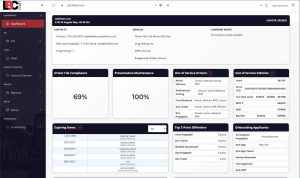
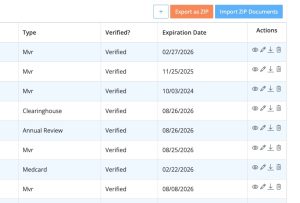
This is the failure mode software is built to kill. A management platform attaches a status to each dated record — valid, expiring, or expired — and rolls those statuses up into a single view across the whole roster. The strongest systems go a step further: instead of alerting an admin who then has to chase the driver, they contact the driver directly. When a credential enters its expiration window — typically flagged 30 days out, with reminders repeating until it’s resolved — the system messages the driver, the driver uploads the new document from their phone, a manager verifies it once, and the file updates itself. The chase doesn’t get easier. It disappears.
The deeper value is that it changes what a compliance lapse costs. A flagged expiration 30 days out is a five-minute task. The same expiration caught by an investigator becomes a violation on your record, and those compound — a cluster of expired medicals or skipped annual reviews is exactly the kind of pattern that drags a safety rating down. We unpack that pattern in more detail in our look at why most DQ files fail in a real audit.
Already have an audit notice in hand and a clock running? That’s a different problem than choosing software — see DOT audit preparation services for help getting files review-ready under deadline.
Order it, track it, and run it in one system
You order MVRs, background checks, and drug tests right inside the platform — the same web program that holds your DQ files, runs hours of service, and manages your fleet. No bouncing between vendor logins.
Most “electronic” setups scatter the work: one login to pull an MVR, another for a background check, a telematics product for hours of service, a document tool for the files. A real platform collapses that. From the driver’s own record you order the MVR, the background check, and the DOT drug test — the consent already captured in the hire packet they signed — and the result files itself against that driver. It’s the same platform behind our electronic DQ file software, carried across the rest of the work instead of stopping at the file.
Watch it work — ordering an MVR and background check from one driver record
Prefer to read it? The five steps
- Open the applicant or driver record.
- Choose what you need — MVR, background check, or drug test.
- Confirm the driver’s details, already on the record, with the consent captured in their signed hire packet.
- Submit. The order goes out without a second login or any re-keying.
- Track it under ordered items; the result lands back in the driver’s file when it’s ready.
This is one of 22 step-by-step walkthroughs — browse the full LBC Fleet Software guide.
It also covers what document tools won’t touch. Hours of service is the clearest case: a file tool has no idea whether a driver qualifies for the short-haul timecard exemption. Drivers who stay within a 150 air-mile radius of their reporting location and clock out within 14 hours don’t need logs or an ELD under 49 CFR Part 395 — but “exempt” doesn’t mean “no records.” You still keep timecards, and the 60/70-hour weekly limit still applies. A system that tracks the exemption keeps those timecards, watches the weekly hours, and flags the day a driver blows the radius and needs a log. Add maintenance and work orders through the same fleet management software, and the file stops being a folder — it becomes one operational record per driver and vehicle.
See the full platform
DOT compliance automation software — compliance and operations in one system
What to look for before you buy
Judge an electronic DQ file system on whether it tracks status, not whether it stores files. The buying questions that separate management from storage are about expirations, integrations, audit output, and who’s accountable when something lapses.
Almost every product in this category will store documents and let you search them. That’s table stakes, not a differentiator. Here’s the shorter list of things that actually decide whether the tool reduces your exposure:
- Expiration tracking across the roster. Can it show you, in one view, every credential expiring in the next 30/60/90 days — and does it push that alert to you, or wait for you to log in?
- Who it contacts, and how. When something’s expiring, does the system message the driver directly and let them upload from their phone — or just alert an admin who still has to chase the driver down? At hire, can the driver fill out and sign the whole packet on a phone?
- Coverage: documents only, or the whole job? Does it also order your MVRs, background checks, and drug tests, and handle hours of service — or will you still run a separate telematics product and three vendor logins to do the actual work?
- Audit-ready output. When an investigator asks for a driver’s file, can you produce a clean, complete, current package in minutes — not a scramble through folders?
- Accountability. Software flags the gap, but someone still has to close it. Be honest about whether you have the staff time to act on the alerts — an ignored alert is no better than no alert.
That last point is the fork in the road. Software is the right answer when you have someone whose job includes acting on the reminders. If you don’t — or you’d rather the recurring chase simply not be your problem — the alternative isn’t a different tool, it’s handing the function off entirely through outsourced DQ file management, where the same tracking happens but the follow-up is someone else’s job.
Frequently asked questions
Are electronic driver qualification files allowed under FMCSA rules?
Yes. FMCSA permits driver qualification records to be kept electronically as long as they’re legible, complete, and can be reproduced on request during a review. The format isn’t what matters to an investigator — completeness and currency are. The requirements for what the file must contain are in 49 CFR 391.51, and they apply identically to paper and electronic files.
What’s the difference between electronic DQ file storage and DQ file management?
Storage means the documents are digitized and searchable — a scanned PDF in a cloud folder. Management means the system tracks the status of each dated record (medical certificate, annual MVR, annual review) and warns you before one expires. Storage tells you where a file is; management tells you which file is about to put a driver out of compliance.
How does DQ file software handle expiring medical certificates and MVRs?
The strongest systems contact the driver directly. A credential is flagged as it approaches expiration — often 30 days out, with reminders repeating until it’s resolved — and the driver is messaged by text and email to upload the new document from their phone. A manager verifies it once and the file updates itself, so the renewal closes without anyone chasing it. Systems that only alert an admin leave the chase in place.
Can drivers complete the whole DQ process from their phone?
Yes, on the better platforms. At hire, the driver gets a digital packet by text and email and fills it out and signs it on a phone, tablet, or desktop, with common fields auto-filling as they go. For ongoing items, the system messages the driver when something’s expiring and they upload the new document from their phone; a manager verifies it once. The full intake-and-upload flow is built to be mobile.
Does DQ file software handle hours of service and the short-haul exemption?
Document-only tools don’t — hours of service sits outside their scope. An operational platform does. For drivers who stay within a 150 air-mile radius of their reporting location and are released within 14 hours, logs and an ELD aren’t required under 49 CFR Part 395 — but the carrier still has to keep timecards showing start, end, and total hours, and the 60/70-hour weekly limit still applies. A system that tracks the short-haul (timecard) exemption keeps those records, monitors the weekly hours, and flags the day a driver exceeds the radius or window and needs a log instead.
If “going electronic” so far has meant scanning paper into a folder, see the difference a real tracking layer makes. Walk through the platform, or talk it through with us first.